
示例
¥Examples
这些示例展示了如何配置 commitlint 的常见用法。
¥These examples show common usages of how commitlint can be configured.
验证问题/工单号
¥Validate for issue/ticket numbers
{
  // ...
  "commitlint": {
    "rules": {
      "references-empty": [2, "never"],
    },
    "parserPreset": {
      "parserOpts": {
        "issuePrefixes": ["PROJ-"],
      },
    },
  },
  // ...
}
自定义 VS Code 中的表情符号和对齐方式
¥Customizing Emojis and Alignment in VS Code
某些终端无法正确计算 Unicode 表情符号的宽度,这可能导致表情符号后缺少空格,从而导致提交提示符中的文本错位。
¥Some terminals have trouble correctly calculating the width of Unicode emojis, which can cause a missing space after the emoji, leading to misaligned text in the commit prompt.

要在 VS Code 中解决此问题,你可以在 commitlint.config.ts 文件中每个表情符号后添加一个空格。
¥To fix this issue in VS Code, you can specify an additional space after each emoji in your commitlint.config.ts file.
import { type UserConfig } from "@commitlint/types";

export default {
  // Use the conventional commit rules as a base.
  extends: ["@commitlint/config-conventional"],
  prompt: {
    questions: {
      type: {
        enum: {
          // Add a space to a few common types for better alignment.
          build: {
            emoji: "🛠️ ", // The extra space fixes the alignment.
          },
          chore: {
            emoji: "♻️ ",
          },
          ci: {
            emoji: "⚙️ ",
          },
          revert: {
            emoji: "🗑️ ",
          },
        },
      },
    },
  },
} satisfies UserConfig;
在提交消息中包含表情符号
¥Include Emojis in Commit Messages
默认情况下,表情符号仅显示在提交消息提示符中。要将它们包含在实际的提交头中,你需要一个自定义解析器和一个启用它们的设置。
¥By default, emojis are only shown in the commit message prompt. To include them in the actual commit header, you need a custom parser and a setting to enable them.
此配置基于传统的提交规则,并使用解析器预设来验证以表情符号开头的提交标头。
¥This configuration is based on the conventional commit rules and uses a parser preset to validate commit headers that start with an emoji.
import type { ParserPreset, UserConfig } from "@commitlint/types";
import config from "@commitlint/config-conventional";
import createPreset from "conventional-changelog-conventionalcommits";
import { merge } from "lodash-es";

// A helper function to create the custom emoji parser preset.
async function createEmojiParser(): Promise<ParserPreset> {
  // Generates the regex from the emojis defined in the conventional config.
  const emojiRegexPart = Object.values(config.prompt.questions.type.enum)
    .map((value) => value.emoji.trim())
    .join("|");

  const parserOpts = {
    // This regular expression validates commit headers with an emoji.
    breakingHeaderPattern: new RegExp(
      `^(?:${emojiRegexPart})\\s+(\\w*)(?:\\((.*)\\))?!:\\s+(.*)$`,
    ),
    headerPattern: new RegExp(
      `^(?:${emojiRegexPart})\\s+(\\w*)(?:\\((.*)\\))?!?:\\s+(.*)$`,
    ),
  };

  const emojiParser = merge({}, await createPreset(), {
    conventionalChangelog: { parserOpts },
    parserOpts,
    recommendedBumpOpts: { parserOpts },
  });

  return emojiParser;
}

const emojiParser = await createEmojiParser();

export default {
  extends: ["@commitlint/config-conventional"],
  parserPreset: emojiParser,
  prompt: {
    questions: {
      type: {
        enum: {
          // Customize emojis and add the extra space for better alignment.
          build: { emoji: "🛠️ " },
          chore: { emoji: "♻️ " },
          ci: { emoji: "⚙️ " },
          revert: { emoji: "🗑️ " },
        },
        // This setting includes the emoji in the final commit header.
        headerWithEmoji: true,
      },
    },
  },
} satisfies UserConfig;
尽管某些表情符号在终端中可能没有尾随空格,但提交消息本身的格式是正确的。
¥Although some emojis may appear without a trailing space in the terminal, the commit message itself is submitted with the correct formatting.
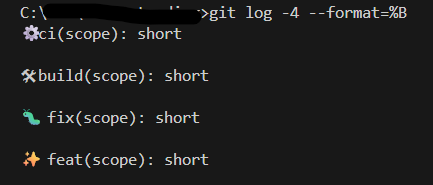
你可以使用 git log -4 --format=%B > commits.txt 来验证这一点。
¥You can verify this with git log -4 --format=%B > commits.txt.
⚙️ ci(scope): short

🛠 build(scope): short

🐛 fix(scope): short

✨ feat(scope): short